Just Let Me Write Digits
Digital identities and what they mean for the web have become a hot topic of discussion in the last few years. They have also brought many controversies: age verification laws and what they mean for online anonymity, Wikipedia potentially having to verify the identify of its users in the UK, the reliance on official iOS and Android operating systems as mandatory form factors for digital identity wallets, not to mention what these inter-dependencies mean when your US digital accounts are cancelled for being a judge at the International Criminal Court.
My story is about the Swiss governmental login system AGOV. Deployed since 2024, it now counts 1.6 million accounts and it is increasingly becoming the login mechanism to benefit from unemployment insurance, file taxes (a mandatory activity!), and many other interactions. In the canton of Zurich, this is the only entry point to apply for citizenship.
So I eventually had to create an AGOV account. Unfortunately, registering an account proved to be a real challenge, until I got the bottom of a weird accessibility bug. Inspired by Just Let Me Select Text, it’s my turn to present you Just Let Me Write Digits.
- AGOV registration
- Contacting support?
- Asking around
- Investigating the web page
- Conclusion
- Post-mortem
AGOV registration
The first step of the AGOV registration process is to provide your email address and enter a verification code to validate the address. My problem was that I couldn’t even enter this code!
To set the context, the form to enter the verification code is split into 6 boxes (one per digit). The first weird thing was that every time I typed a digit, the focus wouldn’t automatically jump to the next box. Instead, the current box would accumulate more digits and highlight them in red, indicating an error.
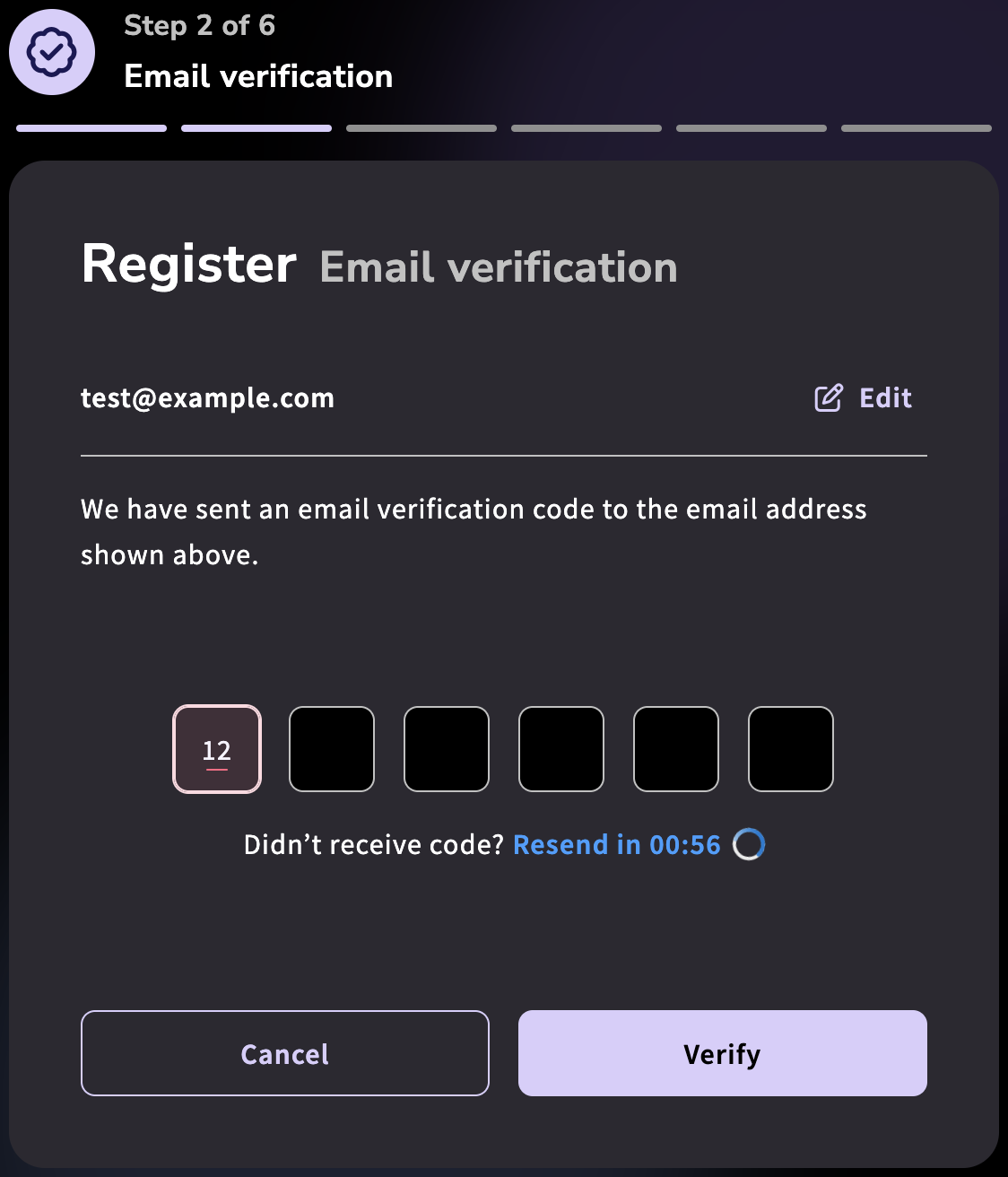
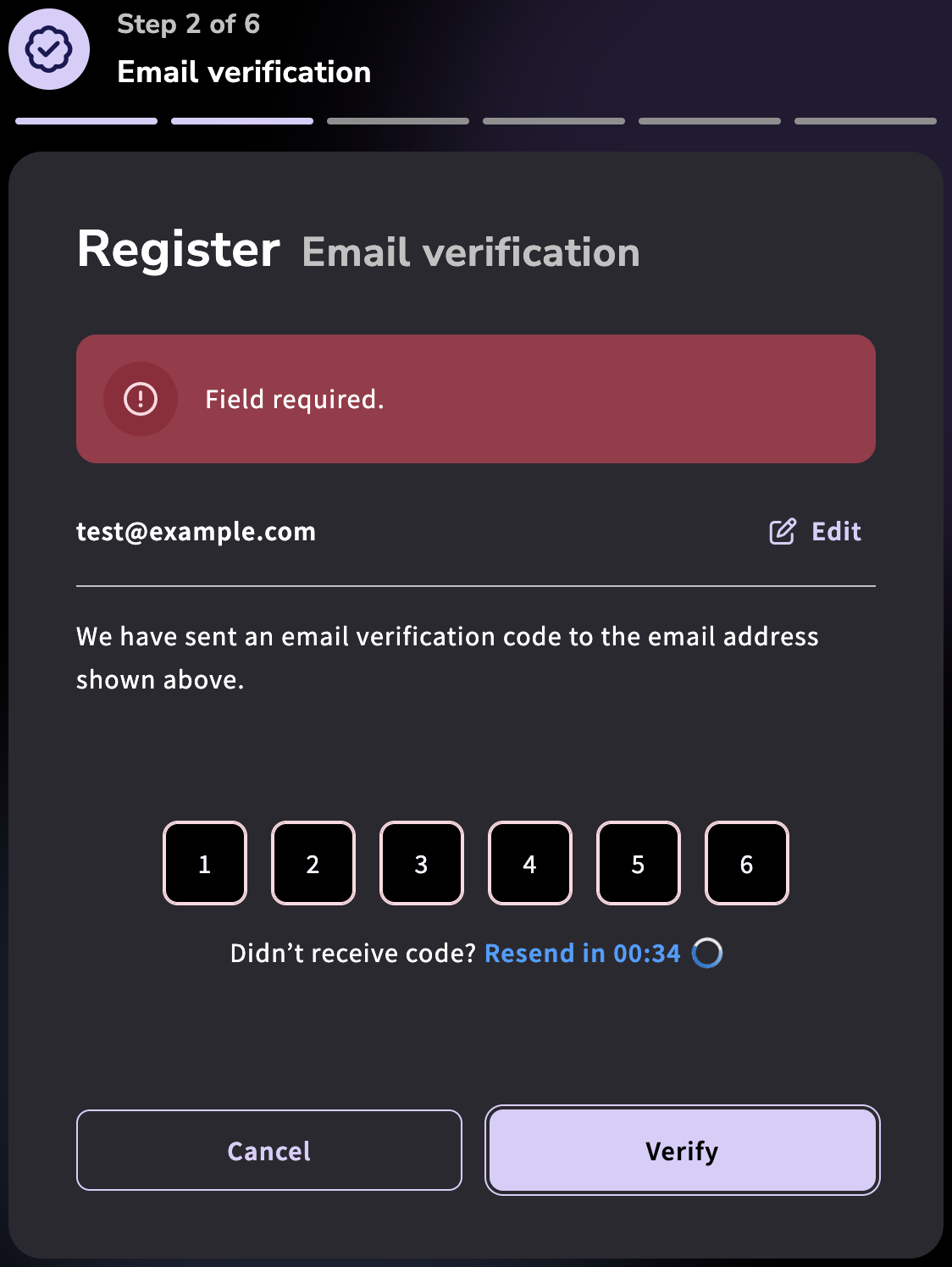
At first, I thought that this was just a minor UI bug, and that I could manually jump to the next box after each digit. However, this didn’t work and the page would always display a “field required” error at the end, even when I carefully filled one digit per box. Strange.
I tried looking at the DOM in the developer tools to see if there was a form value I could manually adjust, but nothing obvious stood out.
No error message was logged either in the web console.
Using a different email address, or even a fake one1 like test@example.com didn’t make any difference.
Given that I was browsing the web with Firefox on Linux, I thought that maybe this combination was unsupported or failing a CAPTCHA.
This would be unlikely – I barely encounter any website broken specifically on Firefox or Linux these days – but not impossible.
Indeed, the registration page connects to eu-api.friendlycaptcha.eu just before the verification code form appears.
And the official AGOV documentation only mentions Windows and macOS as supported operating systems, even though a different page about security keys states that Linux and Firefox are supported.
To rule this out, I ended up trying 6 combinations of browsers and operating systems: Firefox, Chromium and Chrome on Linux; Firefox, Safari and Chrome on macOS. All of them showed the same error!
Contacting support?
At this point I thought it’d make sense to contact the official support. The AGOV website has many help sections, but unfortunately, this didn’t lead me very far because the only way to contact support is via a web form… that starts by sending a verification code to your email! The exact same form I couldn’t pass.
And yes, the FAQ explicitly mentions that this form is the only way to contact support (emphasis mine).
Support for participating authorities is provided by second-level support during office hours exclusively through the creation of tickets online.
The impressum also lists the physical postal address of the Swiss Federal Chancellery, who are likely not the ones directly developing the website anyway. There are no other contact details: no email, no phone number. Alternatively, one can in principle write a comment to “share feedback on AGOV: praise, criticism, requests”, but that again requires an AGOV or equivalent account to log in. A true chicken and egg problem!
I also looked at the online reviews of the AGOV Access Android app, which is currently rated 1.4 stars – by far the worst of any app I’m using. Unfortunately, nobody mentioned an issue similar to mine on these Google Play store comments. Interestingly, there were many comments about support for GrapheneOS (a private and secure mobile OS derived from Android) and the official FAQ now even has an entry about it (emphasis mine)!
The AGOV access App does not work on GrapheneOS because the hardening framework, which protects the AGOV access App against unauthorized manipulation, is not compatible with GrapheneOS. The Federal Chancellery has tasked the supplier with ensuring compatibility.
It sounds promising, but for now you can only register/login with a second-factor device that’s either a smartphone with vanilla iOS or Android, or a security key (good that it’s an option!). Of course, after you pass email verification.
Asking around
I wasn’t in a rush to create my AGOV account yet, so I casually mentioned this issue to some friends, but nobody seemed to have encountered this problem.
I also thought to ask some colleagues and tried the registration page on my work laptop to make a screenshot to show them evidence. Surprisingly, the form worked this time! The autofill automatically jumped to the next box, and it actually detected that I entered an incorrect code rather than no code at all!
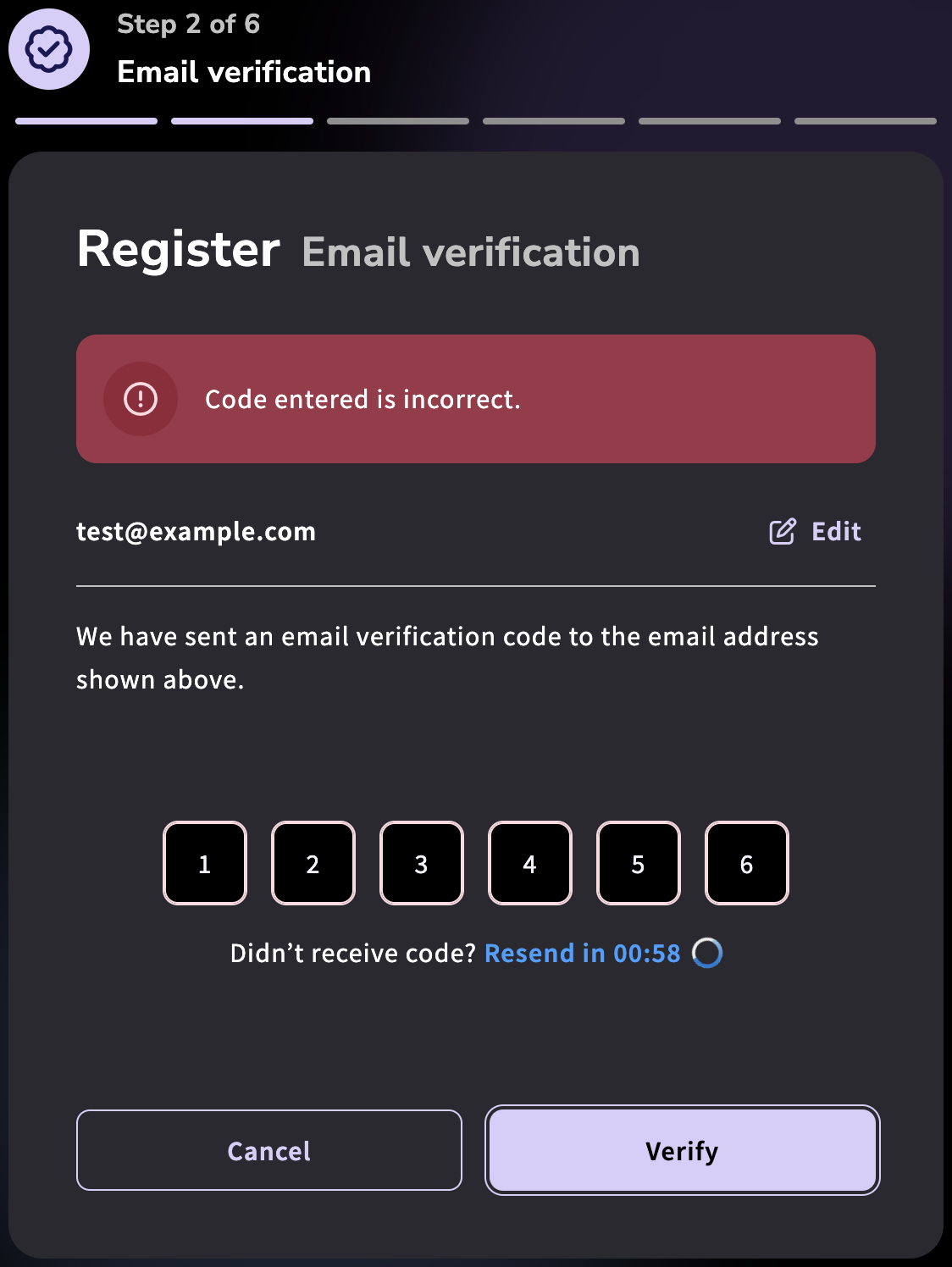 This time the error was “Code entered is incorrect”.
But I obviously don’t want to rely on an employer-issued computer for long-term interactions with the government. Even if I managed to register via my work laptop, there was always a risk that I wouldn’t be able to login with my personal laptop.
Unfortunately, none of my colleagues had encountered my error… I also tried on a friend’s computer, with the same three browsers on macOS, and all of them accepted a verification code!
Was I really that unlucky to own the only two computers in the world for which this website breaks??
Investigating the web page
At this point I was out of simple ideas, so I thought to inspect the web page. It surprisingly loads only a few resources, but the main JavaScript file was 2.4MB, expanding to more than 100K lines of semi-obfuscated/minified code. This looked quite daunting as some parts looked very obfuscated at first glance.
...
var Pc = o(3980),
  eh = o(4572),
  wa = o(9974),
  El = o(2326),
  Tp = o(6450),
  th = o(1203),
  Ld = o(9326);
function Yl(...M) {
  const m = (0, Ld.ms)(M);
  return m
    ? (0, th.F)(Yl(...M), (0, Tp.I)(m))
    : (0, wa.N)((I, _) => {
        (0, eh.P)([I, ...(0, El.K)(M)])(_);
      });
}
...
So I decided to wait a bit more in case someone would have an idea.
According to the FAQ, the source code of the AGOV system will be published at the end of 2026 to satisfy legal requirements.
Article 9 EMBAG stipulates in paragraph 1:
“The federal authorities subject to this law shall disclose the source code of software that they develop or have developed for the fulfilment of their tasks, unless third party rights or security related reasons prevent or limit such disclosure.”
In December 2026, the source code of AGOV will be published in accordance with this requirement. This is the AGOV version that represents the achievement of the AGOV project goal, namely AGOV including AGOV e-ID Verifier. Later versions will be described in the release notes www.agov.ch/rn, prepared for publication after release and published.
Having the source code upfront and a place to report bugs directly to developers would have helped my investigation, but unfortunately for me, AGOV is already the mandatory login system for some services before its source code has been published!
I eventually came back to it, and fortunately searching for “field required” gave some hints into the logic.
get errorMessage() {
  return this.translateService.instant(
    this.emailControl.errors?.required
      ? "GENERAL.text.fieldRequired"
      : this.emailControl.errors?.maxlength?.actualLength > ht.Z.EMAIL_MAX_LENGTH
        ? "GENERAL.text.inputTooLong"
        : "GENERAL.text.emailAddressError",
  );
}
Continuing the search with “required”, I found this email verification function that sets the status code to “REQUIRED”.
onEmailVerification() {
  var _ = this;
  return (0, ve.A)(function* () {
    ((_.showResendSuccessfulBanner = !1),
      _.verificationCode
        ? _.verificationCode.length === _.verificationCodeLength
          ? (_.statusCode.set(""),
            (_.isLoading = !0),
            yield (0, Qt.s)(
              _.registrationService.emailVerification(_.verificationCode, _.userEmail),
            )
              .then((S) => {
                "VALID" === S.status
                  ? _.onEmailVerificationSuccess()
                  : ((_.showCodeValidation = !0), _.statusCode.set(S.status ?? "WRONG"));
              })
              .catch(() => {
                (_.statusCode.set("WRONG"), (_.showCodeValidation = !0));
              }),
            (_.isLoading = !1))
          : (_.statusCode.set("WRONG"), (_.showCodeValidation = !0))
        : (_.statusCode.set("REQUIRED"), (_.showCodeValidation = !0)),
      _.changeDetectorRef.detectChanges());
  })();
}
Eventually, I found the following function, which calls the email verification callback.
At this point the bug became clear to me! Have you found it?
  verificationCodeEntered(_, S) {
    if ("Shift" === this.lastKeyPressed) return;
    switch (S.key) {
      case "Control":
      case "Meta":
      case "Shift":
      case "v":
      case "r":
        return;
      case "Enter":
        return (S.preventDefault(), void this.emailVerificationCallback());
      case "Backspace":
        return (this.setCode(_, "", "backward"), void S.preventDefault());
      case "ArrowLeft":
      case "ArrowDown":
        return void this.goBackward(_);
      case "ArrowUp":
      case "ArrowRight":
      case "Tab":
        return void (_ !== this.codeLength - 1 && (this.goForward(_), S.preventDefault()));
    }
    S.preventDefault();
    const O = Number(S.key);
    isNaN(O) ? (this.getInput(_).value = "") : this.setCode(_, String(O));
  }
It appears that this function intercepts key presses and collects the verification code into a local JavaScript variable. So there was no chance to modify the input form in the DOM after the fact, one would have to find the JavaScript variable and inject it there!
The critical part is that modifier keys are rejected.
And my problem is… that I’m using an AZERTY standard French keyboard layout, where digits are only accessible behind the Shift key. In other words: blocking the Shift key means blocking digits.
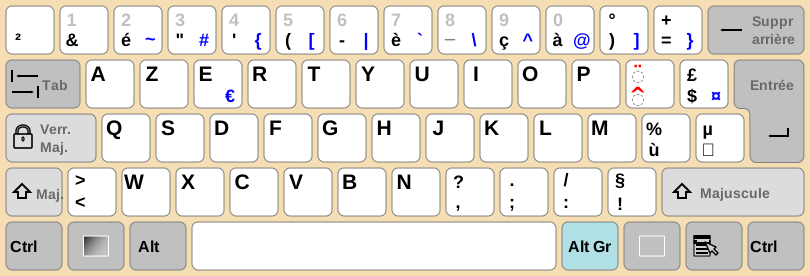 Source: https://en.wikipedia.org/wiki/File:KB_France.svg, license: CC BY-SA 3.0.

It turns out that AZERTY is one of the few keyboard layouts in the world to have digits behind the Shift key. At work I’m using an English (QWERTY) keyboard layout, and none of the people I asked were French, so obviously among the tested computers only my two “broken” laptops were affected.
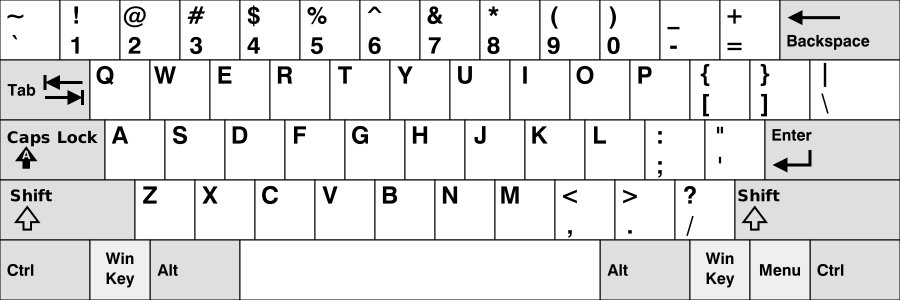 Source: https://en.wikipedia.org/wiki/File:KB_United_States.svg, license: CC BY-SA 3.0.

Switching the keyboard layout at the software level in my operating system indeed fixed the problem on my “broken” laptops, and conversely switching to a French keyboard layout on the “working” devices triggered the bug.
At this point you may wonder how come a Swiss app doesn’t work on a French keyboard: isn’t French one of the official languages in Switzerland? The answer is that the standard Swiss-French keyboard layout is of the QWERTZ family (common in Central Europe), to allow efficient typing in both French and German. Of course, digits don’t require pressing the Shift key with this layout.
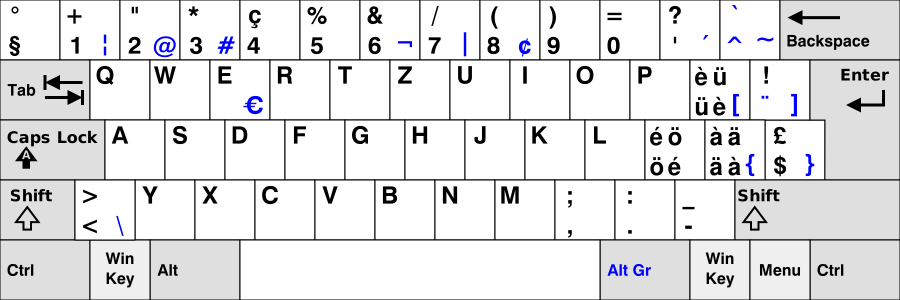 Source: https://en.wikipedia.org/wiki/File:KB_Swiss.svg, license GFDL 1.2.

Still, there are about 171’000 residents of French nationality in Switzerland according to the Swiss Federal Statistical Office, not to mention cross-border workers that may have to interact with the Swiss government. So statistically speaking I’m surprised that this bug hasn’t been noticed and fixed yet!
Conclusion
After switching my keyboard layout, I could finally validate my email address, and register with a security key.
The weirdest part is that my actual identity was never verified in the process! I simply entered my name, phone number and date of birth in the form but these were never verified. The only things that the AGOV system validated is that (1) the email address exists and (2) the second factor is a security key from a model they allow or the AGOV Access app running on an Android or iOS device they allow.
This makes me question the threat model and overall usefulness of the AGOV system. AGOV is resilient against account take-over by remote phishing – which is certainly important for privacy reasons! However, nothing prevents someone else to create an account and put my name and other identity details there.
Upon further investigation, it seems that identity validation is required to access services deemed sensitive. So I just didn’t access a sensitive service yet.
I’ve reported the bug on the help form, but haven’t received any reply yet. Stay tuned!
Post-mortem
I think this incident deserves a little post-mortem, to hopefully avoid similar ones in the future.
What went poorly?
- Making a fancy UI with 6 input fields and a complex JavaScript logic isn’t a resilient way to build a UI. Just use one native browser form field, and decorate it with CSS.
- Completely decoupling the form logic from the DOM, rather than reading values from the DOM upon form submission. An advanced user (or a browser extension) cannot even edit the DOM after the fact because the JavaScript logic has already intercepted the key presses.
- Having only one support channel. A second channel (email, phone, etc.) is best practice for resilience.
- Using the same login logic for the main product and the support channel. By coupling both, you miss bug reports from users who can’t even login. There’s a reason why many providers of Internet services host their status page on a separate domain.
- Gating support behind email verification. Maybe you get less spam, but you also get fewer reports from genuine users.
- Not publishing the source code before the code is deployed and mandated by some systems. The legal requirement to provide the source code isn’t just a compliance checkbox, it’s actually useful for users to troubleshoot issues and socialize bug reports and work-arounds.
What went well?
- The relevant JavaScript logic wasn’t obfuscated. In the end a few string searches were enough to identify the bug. No advanced decompiler, no expensive LLM required. It would have cost me waaay more time to figure it out if the logic was obfuscated or compiled in WebAssembly.
- The relevant code was distributed on the open web, making it easy to download it (even though in minified form) and inspect it for troubleshooting. We may take this as a given, but it would have been more difficult to even access the code if it was distributed only for a few approved walled garden operating systems.
Where did I get lucky?
- Having multiple laptops at hand with various keyboard layouts ruled out many hypotheses early on. A browser-specific or networking problem was unlikely. That said, it took me a while to gather evidence in the initial phase, as I methodically took screenshots of each browser combination to make sure it wasn’t a mistake of my part.
Comments
To react to this blog post please check the Mastodon thread, the Lobste.rs thread and the Reddit thread.
You may also like